Web + mobile · with Pip, your planning coach
The planner that thinks with you.
Plan your week calmly on your laptop, check your day on your phone and let Pip help when your head feels full. Scan paper, move tasks forward and keep school, work and personal life together.
Start free · no credit card required · upgrade whenever you like
Why it feels different
Not a fuller calendar, but tasks you can actually get done.
Able to Plan moves with your day.
From the first loose thought to your end-of-day review, each step makes your plan calmer and more realistic.
Capture
Drop tasks into your inbox, create reminders or speak a quick note when typing is inconvenient.
Organise
Plan tasks around appointments and let Pip make suggestions when your day becomes too full.
Do
See only what matters today: your next task, fixed appointment and relevant reminder.
Reflect
End your day with a short check-in and get advice for a better start tomorrow.
One place for what really drives your day.
Able to Plan brings together the separate systems that usually sit side by side: tasks, calendar, reminders, routines and people.
Your calendar as a baseline
Connect appointments and use them as fixed anchors, then plan tasks around the time you really have.
Routines without repetition
Set recurring tasks once and build habits day by day with a streak.
Web and mobile in sync
Plan the big picture on the web and check in quickly on mobile. Your plan stays the same on every screen.
Shared lists
Use lists for home, work or gifts and share them with a partner, team or housemate.
For school, work and life
Use the same calm plan for lessons, deadlines, household jobs and personal tasks.
Pip recognises your exams
Add a test or exam to your calendar and Pip can suggest study sessions well in advance.
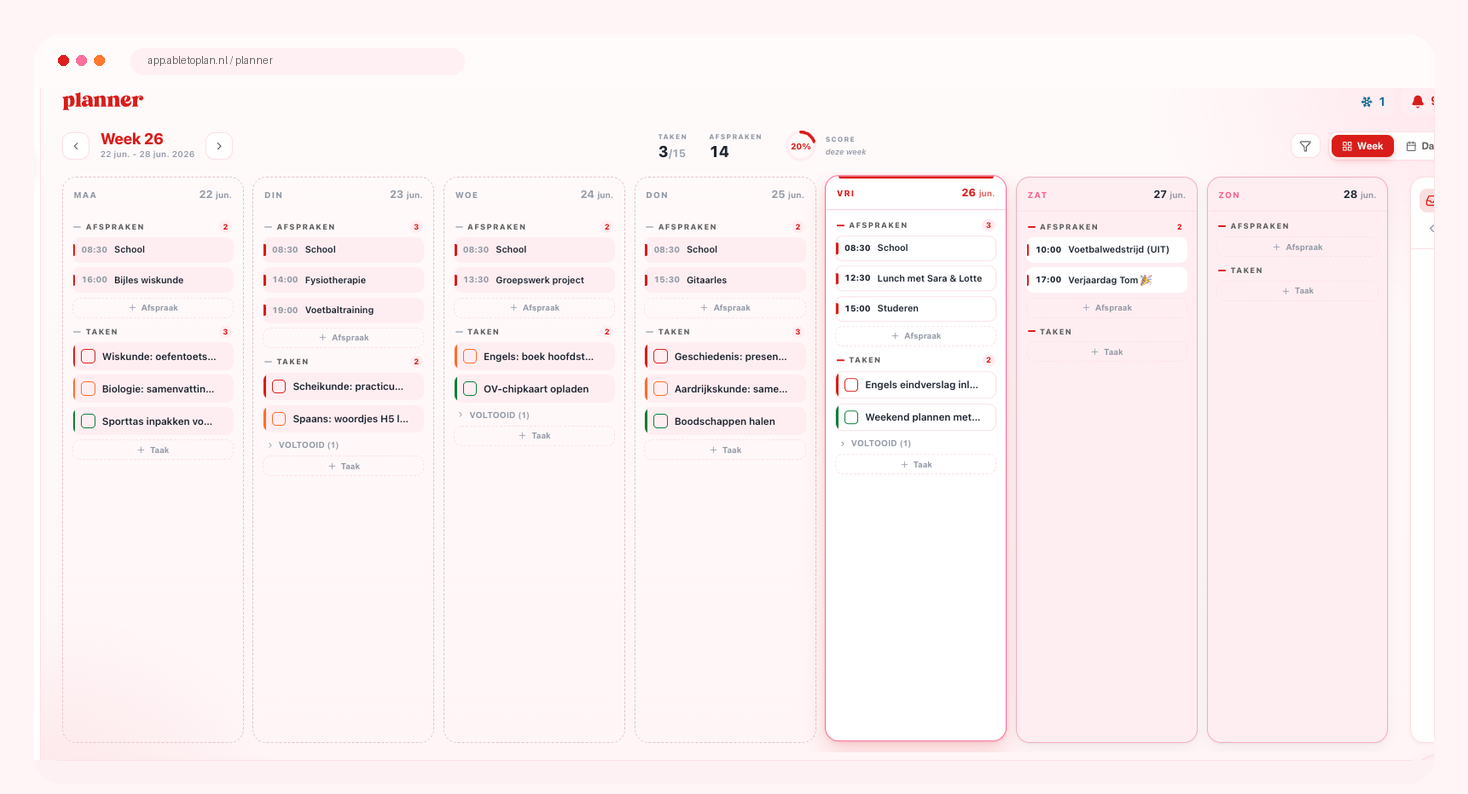
Plan on a bigger screen when you need the overview.
The web app is your calm workspace for weekly planning, study, school and laptop time.
Week view · laptop · classroom
Your whole week side by side
On the web, it is easier to see where tasks fit, which days are becoming too full and what is still waiting in your backlog. Ideal at your laptop, during study blocks or in class when reaching for your phone is not convenient.
For today, on the go and quick actions.
- Day
Check your day quickly
See what matters now, tick things off and capture a new task without opening your whole week.
- Pip
Pip comes with you
Ask for advice on the go or let Pip organise tasks when your plans change.

One coach, three ways to help.
Pip helps with planning, studying and reflecting. Choose what you would like to see. More about Pip →
Planning coach · open tasks
Move unfinished tasks forward calmly
Pip looks at what is still open and spreads tasks across days with room. Today stays achievable and loose tasks no longer drift.
P
Pip
Knows your plan
Move my unfinished tasks forward
I found 5 unfinished tasks.
ActionI will move the 5 unfinished tasks to tomorrow, Friday and Monday.
Study coach · study sessions
Pip sees your exam coming
When a test or exam appears in your calendar, Pip recognises it automatically. If you have not planned study sessions yet, Pip suggests a few across the preceding days so you do not have to start the night before.
P
Pip
Recognises your exams
Your chemistry test is in 3 days. Shall I plan study sessions for you?
Plan study sessions2 study sessions for chemistry
Reflection · check-in
Plan, then learn what works
A short check-in at the end of the day — and after an exam — shows what did and did not work. Pip uses that context to make your next day or next exam feel lighter and smarter.
Evening reflection
How did today feel?
BusyCalmTired
You completed two big tasks. Tomorrow will probably work better if you keep the morning free for focused work.
Start with this tomorrowPractise presentation · 45 min
Exam check-in
Ready for chemistry?
UnsureReadyNervous
You completed 2 study sessions. Review for another 10 minutes tonight for a calm start tomorrow.
Before the examRead the summary once more · 10 min
After the exam
How did chemistry go?
DifficultOkayGood
You felt well prepared. This approach worked — Pip remembers it for your next exam.
For next timeSame approach: 2 study sessions, starting 2 days ahead
Everything that makes your planning feel complete.
Not everything is a task with a deadline. Reminders and habits live alongside your plan without making the day feel fuller.
Reminders beside your plan
Create separate lists for groceries, home, school or work. Add a notification when something needs your attention, without crowding your daily plan.
Track your habits
Set up a habit once and tick it off whenever you do it. See your streak at a glance without turning it into another task.
Discover habitsCapture it by voice
Useful on the go: speak a task or reminder, then deal with it calmly later.
From paper to digital
Scan a planner or loose list and turn it into tasks you can actually schedule.
What people say.
4.8out of 5 · 9 ratings
View on the App StoreReviews translated from Dutch.
Such a lovely planner app!
Nice app, great look and feel, and it lets you plan far ahead. Everything looks clear too, and you don’t need long to get the hang of it. I also like that you can use it on both laptop and phone, and that it syncs well between them. Really a lovely, solid planner app!!
Amazing planner!
What a great app. Exactly what you need to get a real overview!
Planner
Really easy to use! Very useful for planning schoolwork.
So helpful!
I already used the paper planner, but adding the app makes it even better because you can always take it with you!
Happy user!
Very happy with the planner. There are a few things I still miss or have not found yet, but it is lovely to use, especially together with a laptop.
+ planner! - iPhone widget
I love that the paper version of my favourite planner is now online too, so I can take it everywhere.
Start free, upgrade when you want.
Start with a free month of Premium, including Pip. Then choose: continue for free or keep Premium.
🏷️ Save 17%✦ One-time payment
Free
Perfect when you are getting started with the paper planner.
€0
free foreverWhat you get- Tasks & appointments
- Reminders & private lists
- Push notifications
- Week view (mobile)
- 2 scans per week
- Planable planner scans
- Streaks, badges & XP
- Local storage on mobile
- Habits
- Web app
- Cloud sync
- AI coach
- Shared calendars & lists
- Calendar sync (iPhone)
- iOS widgets
- Voice capture with Pip
Premium
Everything you need to get the most from your planner.
€24.99
€19.99
✦ Introductory priceper year — less than €1.67/month
or €1.99/month (cancel monthly)
first year — then €24.99/year
€2.99
€1.99
✦ Introductory priceper month — cancel monthly
first month — then €2.99/month
€69.99
one-time payment — never pay again
lifetime access to all Premium features
- Habits
- Web app
- Cloud sync (all devices)
- AI coach (daily + chat)
- 30 scans per week
- Scan all document types
- Shared calendars
- Shared reminder lists
- Calendar sync (iPhone)
- iOS widgets
- Voice capture with Pip and the iOS widget
🎁 First month of Premium free🔒 Secure payment via Stripe↺ Cancel whenever you like✓ No hidden fees
Prices may change — you will always see the final amount in the app before paying.
Have a question?
Is Able to Plan a calendar app?
No. Able to Plan uses appointments as fixed anchors. The core is seeing tasks, reminders and planning together, so you know what genuinely fits into your day.
What is the web app for?
The web app gives you a calm overview for weekly planning, moving tasks, preparing school or work and planning whenever using your phone is not convenient.
What is the mobile app for?
The mobile app is for daily focus: quickly seeing what matters now, ticking things off, creating reminders and capturing something on the go.
What exactly does Pip do?
Pip looks at your tasks and plan, helps you prioritise, can organise unfinished tasks and offers advice when your day feels too full or unclear.
How much does Able to Plan cost?
When you create your account, you automatically get a free month of Premium, including the web app, cloud sync and Pip. After that you can continue for free with tasks and appointments, or keep Premium to keep using those features. See the current prices above — the app always shows the final amount before you pay.
Does the app work offline?
Tasks are available locally, so your plan stays visible. Changes sync when you are online again. AI features require an internet connection.
How secure is my data?
Your plan is stored encrypted. You can delete your account and data from settings.
Start with a day that feels right.
Plan your week on the web, check your day on mobile and let Pip help when everything feels like it is happening at once.